嗚嗚喔學習筆記

搜尋此網誌

2021年4月22日 星期四

Leet Code 四叉樹建立分享

https://leetcode.com/problems/construct-quad-tree/ 四叉樹維基 四叉樹簡介:


好處在做搜尋時比較快。 O(n) -> O(h) // h為樹的高度 //n 為總數

Leet Code 四叉樹建立分享 簡單來說就是用遞迴去跑 8->4->2->1 以此類推

step 1. 判斷是否全 0 or 全 1 如果是 isLeaf = true, reutrn node

step 2. 如果不是把它分成4等份 呼叫遞迴

step 3. 一直到拆分到只剩 1 為止

/*

// Definition for a QuadTree node.

public class Node {

    public bool val;

    public bool isLeaf;

    public Node topLeft;

    public Node topRight;

    public Node bottomLeft;

    public Node bottomRight;


    public Node() {

        val = false;

        isLeaf = false;

        topLeft = null;

        topRight = null;

        bottomLeft = null;

        bottomRight = null;

    }


    public Node(bool _val, bool _isLeaf) {

        val = _val;

        isLeaf = _isLeaf;

        topLeft = null;

        topRight = null;

        bottomLeft = null;

        bottomRight = null;

    }


    public Node(bool _val,bool _isLeaf,Node _topLeft,Node _topRight,Node _bottomLeft,Node _bottomRight) {

        val = _val;

        isLeaf = _isLeaf;

        topLeft = _topLeft;

        topRight = _topRight;

        bottomLeft = _bottomLeft;

        bottomRight = _bottomRight;

    }

}

*/


public class Solution {

    public Node Construct(int[][] grid)

    {

        if (grid == null)

        {

            return null;

        }


        Node root = new Node();

        root = Link(grid);

        return root;

    }


    public Node Link(int[][] grid)

    {

        Node n = new Node();

        if (grid.Length == 1)

        {

            n.val = grid[0][0] == 1;

            n.isLeaf = true;

            return n;

        }


        int size = grid.Length;

        int halfSize = size / 2;


        bool all1 = true;

        bool all0 = true;

        for (int x = 0; x < size; x++)

        {

            for (int y = 0; y < size; y++)

            {

                all0 = all0 && grid[x][y] == 0;

                all1 = all1 && grid[x][y] == 1;

            }

        }


        if (all1)

        {

            n.val = true;

            n.isLeaf = true;

            return n;

        }


        if (all0)

        {

            n.val = false;

            n.isLeaf = true;

            return n;

        }


        int[][] topleft = new int[halfSize][];

        for (int x = 0; x < halfSize; x++)

        {

            for (int y = 0; y < halfSize; y++)

            {

                if (topleft[y] == null)

                {

                    topleft[y] = new int[halfSize];

                }


                topleft[y][x] = grid[y][x];

            }

        }

        n.topLeft = Link(topleft);


        int[][] topRight = new int[halfSize][];

        for (int x = halfSize; x < halfSize * 2; x++)

        {

            for (int y = 0; y < halfSize; y++)

            {

                if (topRight[y] == null)

                {

                    topRight[y] = new int[halfSize];

                }


                topRight[y][x - halfSize] = grid[y][x];

            }

        }

        n.topRight = Link(topRight);


        int[][] bottomLeft = new int[halfSize][];

        for (int x = 0; x < halfSize; x++)

        {

            for (int y = halfSize; y < halfSize * 2; y++)

            {

                if (bottomLeft[y - halfSize] == null)

                {

                    bottomLeft[y - halfSize] = new int[halfSize];

                }


                bottomLeft[y - halfSize][x] = grid[y][x];

            }

        }

        n.bottomLeft = Link(bottomLeft);


        int[][] bottomRight = new int[halfSize][];

        for (int x = halfSize; x < halfSize * 2; x++)

        {

            for (int y = halfSize; y < halfSize * 2; y++)

            {

                if (bottomRight[y - halfSize] == null)

                {

                    bottomRight[y - halfSize] = new int[halfSize];

                }


                bottomRight[y - halfSize][x - halfSize] = grid[y][x];

            }

        }

        n.bottomRight = Link(bottomRight);


        if (n.topLeft == null && n.topRight == null && n.bottomLeft == null && n.bottomRight == null)

        {

            return null;

        }

        else

        {

            if (n.topLeft.val || n.topRight.val || n.bottomLeft.val || n.bottomRight.val)

            {

                n.val = true;

                return n;

            }

            else

            {

                n.val = false;

                return n;

            }

        }

    }

}


2021年3月5日 星期五

Unity TextMeshPro 查看筆記

簡介 : 


支援SDF

支援各種標籤,圖文混排,3D字體,陰影,光影..等等

支援多Font混排( Drawcall++ )


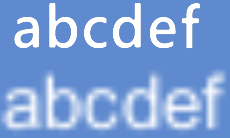
SDF(Signed Distance Field) 簡單來說就是 因為記得邊界距離資訊 , 在拉近放大文字時不會變得糊糊的。 ( 相比Bitmap )

優勢: 1. 減少字集貼圖大小 (順便解決BestFit占用圖集問題)

- BestFit 開啟時 Unity在計算最適合的字體大小過程中, 計算過程中產生的字體都會寫進Texture裡,很浪費空間。

2. Outline 頂點數較小 (4倍)

- Unity本身Outline會多畫4次在文字後面,頂點數也會多4倍。

TMF使用SDF算法則不會增加頂點數,計算直接在Fragment階段做了。

劣勢: 動態生成計算慢。 (極限約20字)


SDF 產圖算法簡介:

step 1. 透過ttf 產出大字體


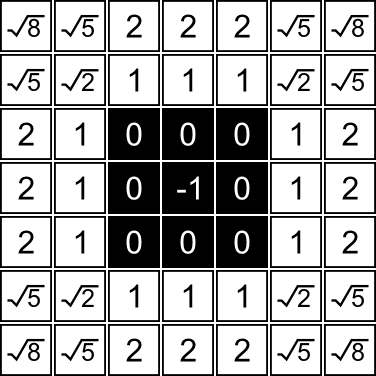
step 2. 分辨字體邊緣內外 & 計算與邊緣距離 & 線性塞進 alpha 得到小圖

具體數據大概是長這樣子的 如下圖:


step 3. 

     Shader 原理很簡單 alpha超過0.5 -> 外界 , alpha 小魚0.5 -> 內界
    或是用內插會更圓滑一點


Shader 改成:

fixed4 frag(v2f IN) : SV_Target

{

if (color.a < 0.5)

color.a = 0.0;

else

color.a = 1.0;

}

or


color.a = smoothstep(_DistanceMark - _SmoothDelta, _DistanceMark + _SmoothDelta, distance);


//--------------------------------------------------------------


多國語言做法  :


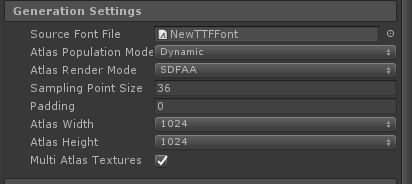
支援 dyniamc SDFAA ( 主要是中文字太多需要用 )

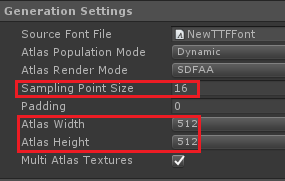
SamplingPointSize : 越高越精細。佔用空間越大。

Multi Atlas Textures : Atlas不夠塞,會幫產新的。


一個 ".ttf " = 一個以上Atlas 不可合併Drawcall。

一個 ".ttf " 如果字不夠塞可產多個Atlas ( 1 Atlas = 1 Drawcall & 記憶體++)  

多個 ".ttf " 可以混用,設定先後順序即可。


坑: 原本Unity的 TextMesh & UIText 在沒有字集的情況下會抓,裝置內的Font來用。

( 比如阿語&韓文 )

目前可抓內建Font List來用,但要開發者自行篩選,還要Runtime產Font,不太可行。


建議:

1.一個Static字集放常用單字 + 一個 dyniamc SDFAA 字集動態生成當備用。

2.確保韓文跟阿語都能正常,要把字集都塞進 同張 .ttf 裡 & 所有語言要測試過沒缺字。 ( 因為沒有抓系統預設Font的功能 )


//--------------------------------------------------------------


效能測試:


Unity 2018.4.2f1 && TextMeshPro 1.5.0


sumsumg

預產圖集(2000單) (SDFAA)

耗時6187ms 

mono:256KB

totol:4097KB ( 3張 1024*1024 atlas )


預產圖集(2000單) (Smooth)

耗時6002ms 

mono:272KB

totol:2976KB ( 3張 1024*1024 atlas )


samsung Galaxy Tab 4 7.0 ( opengl 2.0)

20 (中文字)

200 (中文字)

2000 (中文字)

mono (預先產圖

0KB

0KB

2800KB

mono (產圖 & 塞字

0KB

4KB

3392KB

mono (直接設值

56KB

3016KB

卡死


samsung Galaxy Tab 4 7.0 ( opengl 2.0)

20 (中文字)

200 (中文字)

2000 (中文字)

預先產圖 ( ms )

21

31

157

產圖&塞字 ( ms )

34

114

4316

直接塞字 ( ms )

97

1707

卡死


Htc u11+ ( opengl 3.0)

20 (中文字)

200 (中文字)

2000 (中文字)

預先產圖 ( ms )

20

20

51

產圖&塞字 ( ms )

15

54

1239

直接塞字 ( ms )

49

662

卡死


建議:

常用的能產的先產,加入載入。

如要塞字也先產圖在塞字 會比直接塞字好。

直接塞字記憶體會爆炸..直接卡死。(要再看 Source Code查原因


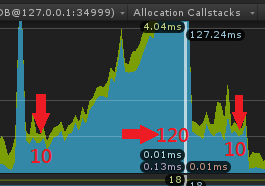
坑: 貼圖字越多時,產新字就越久 ( 20字/每次 )

samsung Galaxy Tab 4 7.0 ( opengl 2.0)

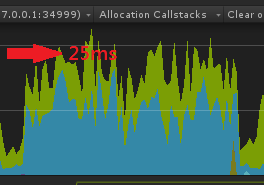
實測在 (250字/每張圖) 以內可以維持30fps : 

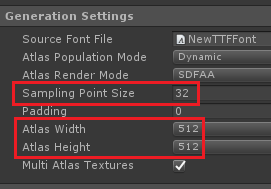
建議設定 font size : 32 , atlas : 512*512


阿語注意:


要下載下面插件 ( For TMP 的阿語偛件 )

https://github.com/mnarimani/RTLTMPro


問題

1. /n 不支援

2. 連接處會有點斷掉


未來:

可以看SourceCode 也可以改。但不開源要自己維護。

//--------------------------------------------------------------


參考連結: 

https://zhuanlan.zhihu.com/p/26217154

https://medium.com/codememo/spark-ar-%E5%AF%A6%E4%BD%9C-sdf-shader-%E4%B8%8A-b0864938df3b

https://www.jianshu.com/p/c466e8b2c854

https://zhuanlan.zhihu.com/p/91689792

https://forum.unity.com/threads/can-i-change-textmeshpro-dynamic-font-atlas-size-in-runtime.674275/

Unity Anti-aliasing shader (SDF)


SDF Genarater

Signed Distance Fields February 18th, 2009

http://www.klayge.org/docs/klayge%E4%B8%AD%E7%9A%84%E5%AD%97%E4%BD%93%E7%B3%BB%E7%BB%9F/#ref_9


https://blog.csdn.net/seizeF/article/details/104657900

SDF演算法參考:

http://www.codersnotes.com/notes/signed-distance-fields/

https://prideout.net/blog/distance_fields/


Unity UIParticle 查看筆記

 UIParticle 查看筆記


GitHub位置 :

https://github.com/mob-sakai/ParticleEffectForUGUI


Default

RenderMode 不設定Overlay , 這做法只是讓UI變3D方式渲染
如果要穿插 UI 要當改Z position 這樣做不太現實 , 也會影響Batch


RenderTexture 

原理: 

1. 將Particle 設定指定的Layer 

2. 再把Camera 設定只看那個Layer

3. Camera 指定Target Texture 畫進去

4. 用RawImage 指定該Textrue 並顯示。


Convert particle to UIVertex

有錯誤 & 有各種奇怪GC 不裡他


Baking mesh(UIParticle)Unity 2018.2 Above

原理 : 

ParticleSystemRenderer.BakeMesh > 抓出Mesh

canvasRenderer.SetMesh (_mesh);

canvasRenderer.SetTexture (mainTexture);

PS : 不需額外Canvas,RenderTextrue,無GC

Canvas to sort

原理:

猜分多個Canvas 設立Order 

如果UI跟特效穿插 , Batch機制會被打亂


結論 : 

2018.2 以上使用 Baking mesh 做法

以下使用RenderTexture做法