嗚嗚喔學習筆記

搜尋此網誌

2020年8月6日 星期四

LINQ&GC&Lamda ( Linq效能的坑 )

為什麼使用 Linq 有時候發現效能不是很好,特別會多出來一些GC量。

( 特別是再做手機遊戲的人,GC 造成的卡頓會特別明顯 )

原因 :

C# 在 new Object 之後,會經過GC回收,所以要避免一直new Object, 這樣會給GC比較大的壓力。


舉個栗子 : 簡單的查找


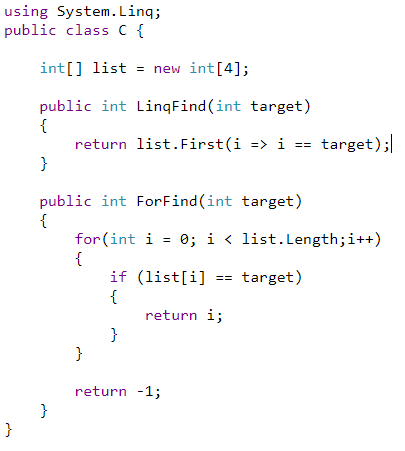
一個使用For 迴圈查找 

一個使用Linq 查找


Lamda 表達式是一個語法糖,經過編譯後 會轉換為下面程式碼:


這裡可以查看 : https://reurl.cc/kd4n4n


轉換前:

轉換後 :

可以明顯看到編譯後的程式碼 

使用Linq 方式他會創見一個 Class &  new Object, 所以他會被GC。(因該要避免)

而且因為在Lamda裡出現的變數都會 "都會變成新Class理的成員", 新Class的成員越多,也就等於GC量越大~ 所以也要小心使用~


結語:


Linq & Lamda 很好用很直覺,但 *不要在迴圈中使用* *不要在Update()中使用* 會產生很多GC !! 請堅持偶爾用用沒關西的原則使用,不要一直用一直爽~


2020年5月12日 星期二

C# Dependency Injection 依賴注入

程式碼常常改來改去的,但怎麼樣在需求改變的時候,只改動最少的東西捏??
這邊介紹一下 "Dependency Injection 依賴注入" 的技巧~~

舉個例子搭車好了
有一個人搭賓士車

public class Human
{
    Benz _c;
    public Human()
    {
        _c = new Benz();
        ...
    }
}

因為這裡 Human 直接參與了 new Benz() (賓士) 的創建過程,所以如果Benz創建過程有改的話 Human也要改,hen麻煩。

現實生活上也不會發生,反正人搭車,人又不是汽車製造商,今天汽車換零件。乾我屁事XD?
所以我們把車改成 "參數" 的方式丟進去就好了~

public class Human
{    
    Benz _c;
    public Human(Benz  b)
    {
       _c = b;
    }
}

ok改成這樣之後 怎麼做汽車跟我就無關咯,反正我只是要搭而已。

有天又想改搭Ferrari(法拉利)了,結果又要改Human。hen麻煩又要改?
不用我們把剛剛的參數 改成 ICar 好了,反正有車搭就行了。( 抽象層次往上提升 )

public interface ICar
{
}

public class Benz : ICar
{
}

public class Ferrai : ICar
{
}

public class Human
{
    ICar_c;
    public Human(ICar c)
    {
        _c = c;
    }
}

好啦改成這樣之後以後要什麼車都可以直接 "依賴注入" 進 human 裡面拉~
這裡就用到物件導向 "多形" 的好處了。
比如 
new Human( new Benz() );
new Human( new Ferrai() );

但其實也沒人規定一定要是汽車吧 , 可以是火車,公車,三輪車有的沒的,只要是交通工具(ITransportaion)就行了
所以也可以改成 ( 抽象程度再提升一階 )

public interface ITransportaion
{

}

public interface ICar : ITransportaion
{


public class Human
{
    ITransportaion _c;
    public Human(ITransportaion c)
    {
        _c = c;
    }
}

好啦改完之後,以後要換成火車也沒問題啦~
這就是一步一步解耦合
從搭個車還要管車子怎麼生產的,到想改搭飛機都行,反正不關我的事,只要能到目的地就好。


上面的例子,我們盡可能地讓各個Class的關聯性不要那麼高
所以最後我們抽象出 ITransportaion 讓 Human 只依賴 ITransportaion 這個介面達到更好的擴充性。

另外 Dependency Injection 對於 "抽象層次" 有很重要的關係,抽象層次越高,擴充性就越好。
如果單單只是用 Dependency Injection 其實意義並不大的感覺。

另外 Dependency Injection 也可以方便測試。
在測試 Human 類別時。
還要創建一台車,往往粉麻煩(取決於創建複雜度)(可能還有環境搭建之類的)

但我們抽離出 ITransportaion 之後做假的測試資料就很方便拉~
2020年5月5日 星期二

Unity Get Sprite Index of Texture , Unity 查找在Texture中的Sprite Index


using System; using System.Linq; using UnityEditor; using UnityEngine;


public static class SpriteUtility

{

public static byte GetSpriteIndex(Sprite sp)

{

if (sp)

{

string spriteSheet = AssetDatabase.GetAssetPath(sp.texture);

Sprite[] sprites = AssetDatabase.LoadAllAssetsAtPath(spriteSheet)

.OfType<Sprite>().ToArray();


int index = Array.FindIndex(sprites, s => s.name == sp.name);

return (byte)index;

}

else

{

return 0;

}

}

}


2020年4月24日 星期五

Unity Serialization by Json or Binary

對於Unity 序列化 & 反序列化 大致上有的選擇有 Json , Binary , YAML
YAML屬於Unity Prefab 儲存格式沒啥問題先不討論。


Json 我選用 LitJSON
Binary 選用 BinaryFormatter

總之因為這兩個都沒對 Unity 的特定資料結構處理 比如Vector2 Vector3 之類的所以使用上會出現下面的問題


Json 出現的問題 : 


JsonException: Max allowed object depth reached while trying to export from type UnityEngine.Vector2

Binary 出現問題 : 


UnityEngine.Vector2' in Assembly 'UnityEngine.CoreModule, Version=0.0.0.0, Culture=neutral, PublicKeyToken=null' is not marked as serializable.

經過Google一番,總之就是新增定義Unity專用的序列方法,總之我把他解決了並且放在GitHub上。
連結在這 :


使用範例 : 


using EasyButtons; using LitJson; using System; using System.IO; using UnityEngine; [Serializable] public class Test { public Vector3 Vec3 = new Vector3(1f, 2f, 3f); public Vector2 Vec2 = new Vector2(4f, 5f); } public class Example : MonoBehaviour { [Button] public void DataToJson() { string path = Path.Combine(Application.dataPath, "Test.json"); string json = JsonMapper.ToPrettyJson(new Test()); File.WriteAllText(path, json); } [Button] public void JsonToData() { string path = Path.Combine(Application.dataPath, "Test.json"); string json = File.ReadAllText(path); Test test = JsonMapper.ToObject<Test>(json); Debug.LogFormat("vec2{0} vec3 {1}", test.Vec2, test.Vec3); } [Button] public void DataToBytes() { string path = Path.Combine(Application.dataPath, "Test.bytes"); byte[] b = BytesMapper.ToBytes<Test>(new Test()); File.WriteAllBytes(path, b); } [Button] public void BytesToData() { string path = Path.Combine(Application.dataPath, "Test.bytes"); byte[] b = File.ReadAllBytes(path); Test test = BytesMapper.ToObject<Test>(b); Debug.LogFormat("vec2{0} vec3 {1}", test.Vec2, test.Vec3); } }

2020年4月6日 星期一

Unity 打包單個 exe

教學 : https://unitycoder.com/blog/2019/05/09/creating-single-exe-from-unity-build-files/

總之Unity建完 exe 檔後 會付贈 dll 跟 data 資料夾 反正就不是單個 exe檔
hen麻煩

所以去下載

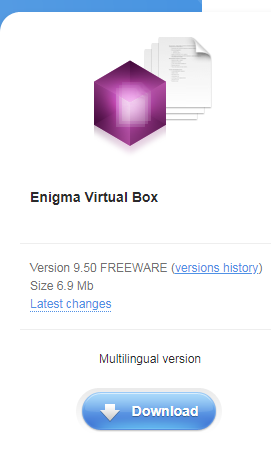
https://enigmaprotector.com/en/downloads.html


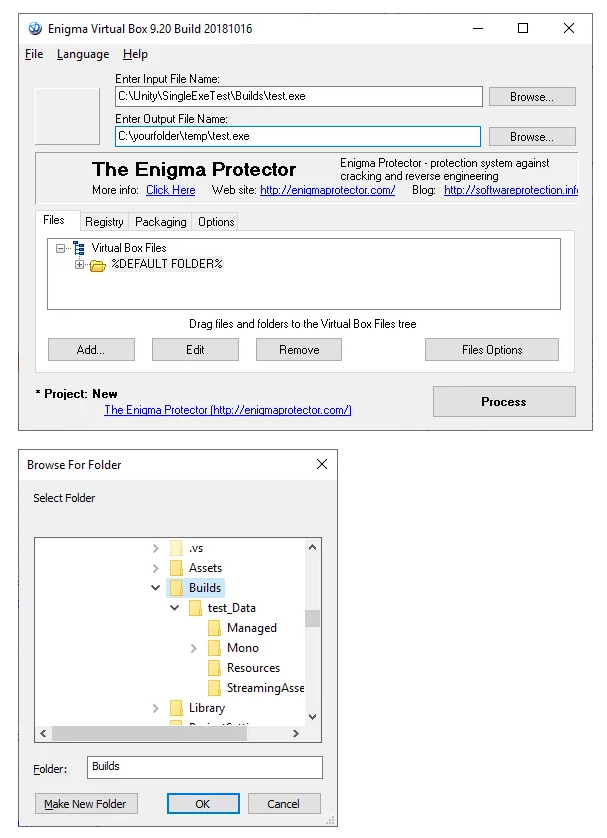
接下來照著圖的步驟走 * 關鍵 * Enter Output File 請指定到別的資料夾 & 檔名要跟原本的相同。


2020年1月21日 星期二

Unity StreamingAssets Android 讀取檔案的坑

Unity StreamingAssets 在 Android下的坑有兩個

1. 如果要用 AssetBundle.LoadFromFile 的 API Assetbundle 讀取路徑要改成
      
     string p = Application.dataPath + "!assets";
     AssetBundle.LoadFromFile(path + "/" + MyAssetBundle);

2. 如果是讀檔案不能直接使用 File.xxx 系列 要改成用 WWW or UnityWebRequest 
      
     var unityWebRequest = UnityWebRequest.Get(Path.Combine(Application.streamingAssetsPath, "MyFile.txt"));
     unityWebRequest.SendWebRequest();
     while (!unityWebRequest.isDone) { }
     string txt = unityWebRequest.downloadHandler.text;

2019年12月9日 星期一

Unity Sync .meta file , Unity 同步meta檔案

有時候會同個案子會開多個 UnityProject , 在互相搬移資料情況下如果meta檔案不同步
就可能造成 missing Script 等等問題 所以弄了一個.bat檔 來同步 *meta 檔案

如下 :


建議使用.bat 之前 先關閉unity 以免有什麼奇怪的狀況。
   

:: 設定你的路徑
set srcProjPath=C:\{yourSrcProj}\Assets\
set dstProjPath=C:\{yourDstProj}\Assets\

:: 將目標專案所有的 .meta 檔案隱藏的屬性取消才能覆寫 ( unity 會將 .meta 自動設定為隱藏 )
attrib +h /s /d %dstProjPath%"*.meta"
attrib -h /s /d %dstProjPath%"*.meta"

::複製所有 .meta 檔案 & 覆蓋
xcopy /s %srcProjPath%"*.meta*" %dstProjPath% /Y